Create a Standard Inspection
Standard inspections can only be created from a work order.
 TIP: See Create a Standard Inspection for a quick start guide on this subject.
- Open a work order attached to the desired asset(s).
- Select the assets in the Assets panel. If you have multiple assets selected, an inspection is created for each asset.
-
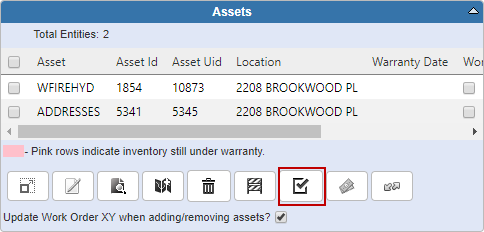
The asset group, asset type, and related templates display in the Create an Inspection panel.
- The Currently Select Assets panel lists the selected assets. If you do not want to create an inspection for one of the assets, clear the check box next to that asset.
The Open Work Activities panel displays if the selected assets have any open work activities attached to them.
-
Select the desired template
The work order that the inspection was created from is displayed


